
The app, not the subscription, decides whether your streams buffer. A $30 plan on the wrong player still stutters, while the best IPTV player on the right device runs clean. In 2026, IPTV subscribers are projected to reach roughly 398 million worldwide, passing cable TV for the first time (Apprupt, 2026). So the question stops being “which subscription?” and becomes “which is the best IPTV player for me?” By the end of this guide, you’ll know exactly which app to install for your device and your budget. New to the format? Start with our complete IPTV setup walkthrough.
Key Takeaways
- TiviMate is the best IPTV player for Android TV and Fire Stick power users (best program guide, recording, multi-view).
- IPTV Smarters Pro wins for mixed-device homes and iPhone (free, runs on six platforms).
- Kodi wins for tinkerers who want a full media center.
- All three take the same Xtream Codes or M3U login, so one IPTV Quebec subscription works in every app.
What should you look for in the best IPTV player?
Match the player to your screen first. In 2025, Smart TVs led Best IPTV Player viewing with a 48.6% device-type share, while smartphones and tablets were the fastest-growing segment at a 21.2% compound annual growth rate (SNS Insider, 2025). The best IPTV player is simply the one built for the device you actually watch on.
Six things separate a great player from a frustrating one: program guide (EPG) quality, device compatibility, playback performance, recording (DVR), multi-screen support, and price. Most people overweight price and underweight the guide. That’s backwards. A clean, accurate EPG is the single biggest day-to-day difference between apps, because it’s the screen you stare at every time you turn on the TV.
One thing every player has in common: it carries no channels of its own. The app is just a window. Your provider supplies the M3U link, the EPG data, and the Xtream login that fill it. If you’re unsure which format you have, our guide on M3U vs Xtream Codes explained breaks it down in plain language.
Hardware matters more as resolution climbs. A single 4K stream needs around 25 Mbps of throughput, and operators now price ultra-high-definition tiers at 30 to 50 percent premiums over HD (Mordor Intelligence, 2026). Translation: if you pay for 4K, your player still needs working hardware decoding, or the picture will stutter no matter how fast your internet is.
Here’s the full feature matrix at a glance.
| IPTV Player | Platforms | Program guide (EPG) | Recording (DVR) | Multi-screen | M3U + Xtream | Price |
|---|---|---|---|---|---|---|
| IPTV Smarters Pro | Android, iOS, Windows, macOS, Smart TV, Fire Stick | Good, provider-dependent | Basic | Up to 4 | Yes | Free |
| TiviMate | Android TV, Fire TV/Stick, Android boxes | Best in class, up to 7-day grid (Premium) | Strong | Up to 4 (Premium) | Yes | Free / $9.99 yr / $33.99 lifetime |
| Kodi | Windows, macOS, Linux, Android, Fire Stick, Raspberry Pi | Via PVR add-on | Via add-on | Limited | Yes (via add-on) | Free |
| GSE Smart IPTV | iOS, Android | Solid | Basic | Limited | Yes | Free (with ads) |
| Perfect Player | Android, Windows | Basic | No | No | M3U mainly | Free |
[IMAGE: home screen of the best IPTV player showing Live TV, Movies, and Series tabs on a large TV. ALT TEXT: “best IPTV player home screen with Live TV, Movies, and Series tabs”. Suggested source: your own app screenshot, or a free image from Pixabay/Unsplash searched for “smart tv streaming interface”.]
IPTV Smarters Pro is the best IPTV player for cross-platform households
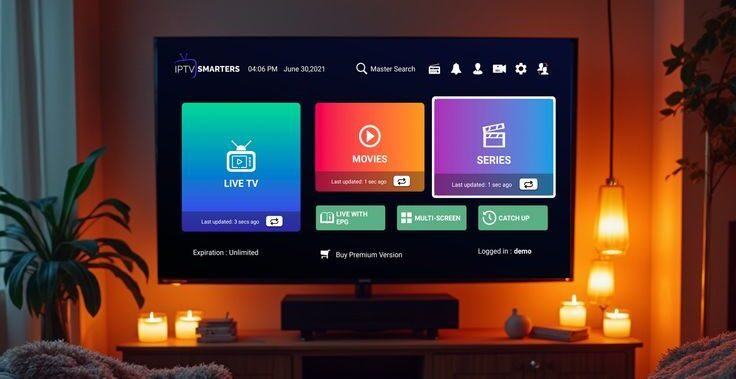
IPTV Smarters Pro is the most widely installed Best IPTV Player in the world right now, and the reason is reach. It runs natively on Android, iOS, Windows, macOS, Smart TVs, and Fire Stick, and it reads Xtream Codes logins on every one of them. For a household juggling a Fire Stick, an iPhone, and a Windows laptop, that single-app consistency is its whole pitch.
What do you get inside? Multi-profile support, separate Live, Movies, and Series tabs, a parental PIN, multi-screen up to four channels, and 7-day catch-up where your provider supports it. None of it asks much of you. You paste your credentials once and it works.
The iOS angle is the quiet winner. Most serious players are Android-only, so iPhone and iPad owners have a short list, and Smarters sits near the top of it. If half your family watches on Apple devices, this app removes a real headache.
It isn’t perfect. Recording is lighter than TiviMate’s, and the mobile layout still feels built for a TV remote rather than a touchscreen. For everyday viewing across a mix of gear, though, few apps come close. And the price helps: it’s free.
According to multiple 2026 player comparisons, IPTV Smarters Pro supports six platforms with native Xtream Codes login, more than any other mainstream player, which makes it the default pick for homes that watch across phones, laptops, and TV sticks at the same time.
[IMAGE: IPTV Smarters Pro home interface with Live TV, Movies, and Series tiles. ALT TEXT: “IPTV Smarters Pro home screen on Android, iOS, and Windows”. Suggested source: your own app screenshot.]
TiviMate is the best IPTV player for Android TV and Fire Stick
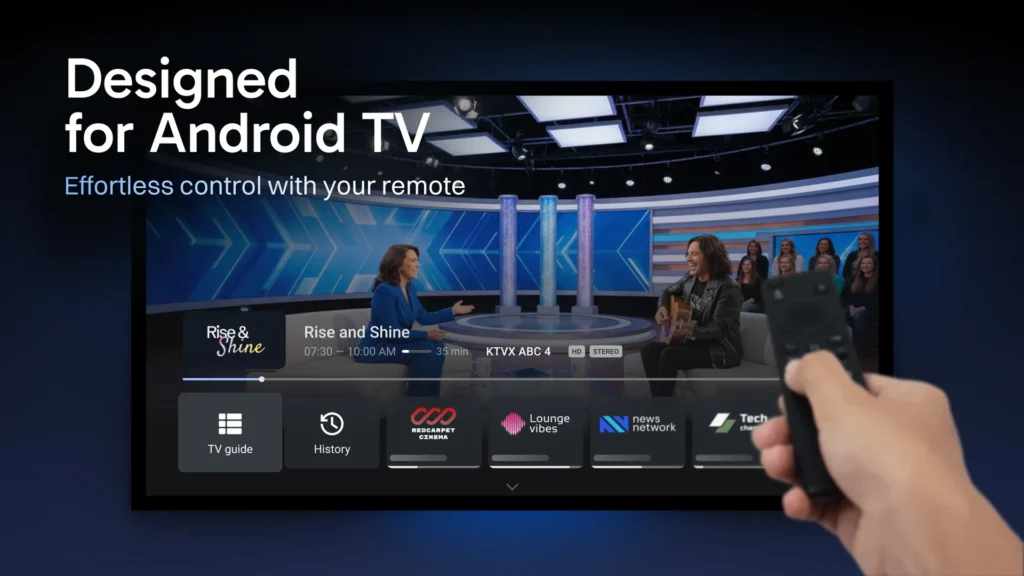
TiviMate is the gold standard on Android TV and Fire Stick, and cord-cutters reach for it because of the guide. Its multi-day EPG grid (up to 7 days on Premium, depending on your provider’s data) shows channel logos, catch-up indicators, and what’s on next in a layout that feels like a real TV guide rather than a list.
The strengths stack up fast: hardware decoding for smooth HD and 4K, multi-playlist merging, custom channel groups, DVR recording, and multi-view for up to four games at once. If you watch a lot of live sport, that multi-view alone can replace a second app. For Android TV owners, it’s hard to beat.
Now the honest caveat that most blogs bury: TiviMate is Android-based only. There’s no iPhone build, no iPad build, no Windows or macOS version. If your living room runs on Android TV or a Fire Stick, this doesn’t matter. If you’re an Apple household, TiviMate is off the table, full stop.
What does it cost? The free tier covers everyday viewing on a single playlist with a 2-day guide. Premium runs $9.99 per year or $33.99 once for lifetime, and it covers up to five devices (TiviMate feature guide, tvimate.co, 2026). Premium is what unlocks unlimited playlists, recording, multi-view, and the longer guide.
How does that compare to other paid options? Here’s the annual cost picture.Annual cost of popular Best IPTV Player (2026)Most full-featured players are free; only TiviMate and OTT Navigator charge$0$5$10$15OTT Navigator$11.88TiviMate$9.99IPTV Smarters ProFreeGSE Smart IPTVFreePerfect PlayerFreeSource: TiviMate (tvimate.co) and app store listings, 2026
[IMAGE: TiviMate EPG grid showing channel logos and a multi-day program guide. ALT TEXT: “TiviMate EPG grid, the best IPTV player for Android TV”. Suggested source: your own app screenshot.]
Kodi is the best IPTV player for a full media center
Kodi is free, open-source, and runs almost everywhere: Windows, macOS, Linux, Android, Fire Stick, and Raspberry Pi. It turns any of those into a complete media center, and it streams IPTV through the built-in PVR Best IPTV Player Simple Client add-on. If you want one app for your local movie library and your live channels, Kodi is the app for the job.
The flexibility is unmatched. Thousands of add-ons, custom skins, timeshift and recording with the right configuration, and total control over how everything looks. Power users love it for exactly that reason.
The trade-off is setup. Kodi has the steepest learning curve here. You have to install and configure the PVR Best IPTV Player Simple Client, point it at your M3U and EPG URLs, and enable the add-on before a single channel appears. On low-RAM hardware like an older Fire Stick, it can also feel heavier than a purpose-built player.
One practical fix worth knowing: if Kodi buffers, raise the cache size in its advancedsettings.xml file. A bigger buffer smooths out shaky streams on slower connections. Need help wiring up the guide? Our EPG setup guide covers the exact fields. Best of all, Kodi has no ads and no premium tier. It’s genuinely free, forever.
[IMAGE: Kodi interface showing the PVR live TV section. ALT TEXT: “Kodi PVR IPTV Simple Client live TV interface”. Suggested source: your own Kodi screenshot.]
What about iPhone, Smart TV, and older devices?
Your device dictates the shortlist, and iOS is the strictest gatekeeper of all. Because Apple restricts how media apps work, most Android-friendly players never make it to the App Store, so iPhone and iPad users need a specialist app. Below is the quick map to the best IPTV player by device type.
Best IPTV player for iPhone and iPad
GSE Smart IPTV is the go-to native Apple option and a favorite among iPhone owners. It handles both M3U and Xtream Codes, includes a solid EPG, and behaves well on iOS. IPTV Smarters Pro is the strong alternative if you want one app that also matches your Android and Windows devices.
Best IPTV player for Samsung and LG Smart TVs
Smart TV owners should look at apps built for the TV’s own store, like Smart IPTV (SIPTV), SET IPTV, or IBO Player Pro. They use a remote-friendly tile layout, authenticate natively, and skip sideloading entirely. Many charge a small one-time activation fee instead of a subscription, which is worth checking before you commit.
Best IPTV player for older or low-RAM Android boxes
Running an aging Android box? Perfect Player is lightweight and gentle on old hardware. The catch: it leans on M3U rather than Xtream, so you may need to convert your login to an M3U URL first, and it skips multi-screen and VOD. For a second-screen box, that’s often a fair trade.
Best for quick testing on a desktop
VLC is the fastest way to confirm a stream actually works. Paste your M3U link, hit play, and you’ll know in seconds whether the problem is your provider or your player. There’s no EPG, so it’s a diagnostic tool, not a daily driver.
How wide is each app’s reach? This chart counts the platforms each player supports.How many platforms does each player support?Operating systems and devices with a native or supported build0246IPTV Smarters Pro6Kodi6TiviMate3GSE Smart IPTV3Perfect Player2Source: compiled from official app availability, June 2026
[IMAGE: device collage showing a Fire Stick, a Smart TV, an iPhone, and an Android box. ALT TEXT: “choosing the best IPTV player by device”. Suggested source: your own photos or free stock from Pixabay/Unsplash.]
TiviMate vs IPTV Smarters vs Kodi: which is the best IPTV player?
There’s no single winner, and any guide that crowns one is selling you something. The best IPTV player for you comes down to three questions: what device you watch on, how much you care about the program guide, and what you’ll spend. Get those three answers and the choice makes itself.
Here’s a decision flow most comparisons skip. Run it top to bottom:
- Device first. Android TV or Fire Stick, and you want a premium feel? TiviMate. A mix of phones, laptops, and TVs, or any Apple device? IPTV Smarters Pro. Apple-only? GSE Smart IPTV. An old, low-RAM box? Perfect Player.
- Then the guide. If a rich, accurate EPG is the feature you’d miss most, that pushes you toward TiviMate on Android, or Smarters elsewhere.
- Then budget. Only TiviMate charges among the mainstream picks, and even that is $9.99 a year. Everything else here is free.
Why does device come first instead of features? Because the living-room screen still leads, but only barely. Smart TVs accounted for 48.6% of IPTV viewing in 2025, which means slightly more than half of all watching happens somewhere else: phones, tablets, laptops, and boxes (SNS Insider, 2025). Your second and third screens aren’t an afterthought. They decide which player fits your home.IPTV viewing by device type (2025)The big screen leads, but barely half of viewing happens there48.6%Smart TVSmart TV: 48.6%All other devices: 51.4%Source: SNS Insider, 2025
The honest summary: all of these apps are excellent. A “wrong” choice here almost always means a mismatched device, not a bad app.
How do you reduce buffering on any Best IPTV Player?
If a stream buffers after a clean setup, the cause is usually your connection or your decoder, not the app itself. Even a great player can’t outrun a weak network. Remember the bandwidth math from earlier: a 4K stream wants about 25 Mbps, and demand only rises as more providers push ultra-high-definition tiers (Mordor Intelligence, 2026). Most “it buffers” complaints trace back to that gap between what 4K needs and what the network delivers.
For reference, a healthy Best IPTV Player channel change usually takes about 1.7 to 4 seconds to load (SNS Insider, 2025). If your channels swap in that window, your setup is fine and any stutter is a bandwidth or decoder issue. If they hang far longer, look at the network first.
Work through this checklist in order:
- Switch the player to hardware decoding. This single setting is the most common fix for choppy HD and 4K.
- Go wired, or get close to the router. Ethernet beats Wi-Fi every time. If you must use Wi-Fi, sit on the 5 GHz band near the router.
- Try an external player. Apps like XCIPTV or Smarters can offload playback and cut buffering versus a built-in decoder.
- Clear the cache and hide unused categories. A lighter app is a faster app. On Kodi, raise the cache in
advancedsettings.xml. - Add a VPN. A VPN can stop your ISP from throttling video during peak hours, and most 2026 setup guides recommend one for privacy too.
Our finding: In our experience setting up subscribers across devices, the single biggest source of “it keeps buffering” tickets isn’t the app at all. It’s a 2.4 GHz Wi-Fi signal fighting through two interior walls. Move the device closer to the router, or run an Ethernet cable, and most of those reports vanish before we change a single setting.
One more pattern worth knowing: when a channel that always worked suddenly buffers, it’s usually provider-side, not you. Heavy CDN load during a big match can slow a single channel for everyone at once. For the full sequence, see our IPTV buffering and troubleshooting fixes.
Do all Best IPTV players work with the same subscription?
Yes. Any player that supports Xtream Codes takes the same three fields, server URL, username, and password, so one subscription powers every app you install. There’s nothing to reconfigure on the provider side when you switch.
That universality is the part most guides never spell out, and it’s genuinely useful. The same M3U or Xtream login works in TiviMate, IPTV Smarters, Kodi, and GSE at the same time, subject only to your plan’s simultaneous-connection limit. You can run the best IPTV player for each device side by side: TiviMate on the living-room Fire Stick, Smarters on your iPhone, and Kodi on a laptop, all from one set of credentials.
This is also where a clean provider earns its keep. IPTV Quebec sends your M3U link, EPG, and Xtream login together by email, so they drop straight into any player above in minutes. Pick your app, and we’ll handle the credentials. Ready to start? See our IPTV Quebec subscription plans.
Frequently Asked Questions
What is the best IPTV player for Firestick?
TiviMate is the best IPTV player for Firestick when you want a premium experience, thanks to its program guide, recording, and multi-view. IPTV Smarters Pro is the simpler choice if you want easy setup. Both install on Fire Stick by sideloading through the Downloader app, since they aren’t in Amazon’s main store.
What is the best IPTV player for iPhone?
GSE Smart IPTV is the best IPTV player for iPhone, with M3U and Xtream support plus a built-in EPG. IPTV Smarters Pro is the strong alternative and syncs with your other devices. Apple’s restrictions keep most Android-only players off iOS, so the iPhone shortlist is short by design.
Is TiviMate Premium worth it?
For Android TV and Fire Stick users, usually yes. The free tier handles everyday viewing on one playlist, but Premium ($9.99 per year or $33.99 lifetime) unlocks recording, multi-view, unlimited playlists, and the longer guide across up to five devices. If you only watch live TV on a single list, the free version is plenty.
Do I need a VPN for Best IPTV Player?
A VPN isn’t required, but it’s recommended. It stops some ISPs from throttling streaming during peak hours and adds a layer of privacy. With 4K streams needing around 25 Mbps, throttling shows up fast as buffering, so a VPN can keep an otherwise healthy connection smooth.
Can I use the same playlist on multiple devices?
Yes. The same Xtream Codes or M3U credentials work in every compatible player at once, up to your plan’s simultaneous-connection limit (commonly one to five streams). You can run different apps on different devices without reconfiguring anything on the provider’s end.
The bottom line
Match the app to your device and the rest falls into place. The best IPTV player for Android TV and Fire Stick is TiviMate, IPTV Smarters Pro is the best IPTV player for cross-platform and iPhone homes, and Kodi is the choice for anyone who wants a full media center. All three share one login, so you’re never locked into a single app.
A few things to carry with you:
- Your device decides the app, not the other way around.
- The program guide is the real day-to-day differentiator, not the price.
- Buffering is almost always network or decoder, rarely the app.
- One IPTV Quebec login works in every player here, so you can mix and match.
Choose your player above, then subscribe and we’ll email your credentials instantly. Once you’ve picked, our complete IPTV setup walkthrough gets you watching in minutes.
Sources, retrieved 2026-06-28:
tvimate.co, “TiviMate Premium Features Guide 2026: Complete List & Pricing,” https://tvimate.co/tivimate-premium-features/
Apprupt, “IPTV Statistics 2026 and Beyond: Market Size, Growth, and Key Trends,” https://www.apprupt.com/iptv-statistics/
SNS Insider, “Internet Protocol Television Market Report,” https://www.snsinsider.com/reports/internet-protocol-television-market-8858
Mordor Intelligence, “Internet Protocol Television (IPTV) Market,” https://www.mordorintelligence.com/industry-reports/internet-protocol-television-iptv-market